How to Send USDT and USDC on Spenda: A Simple Guide to Stablecoin Transfers

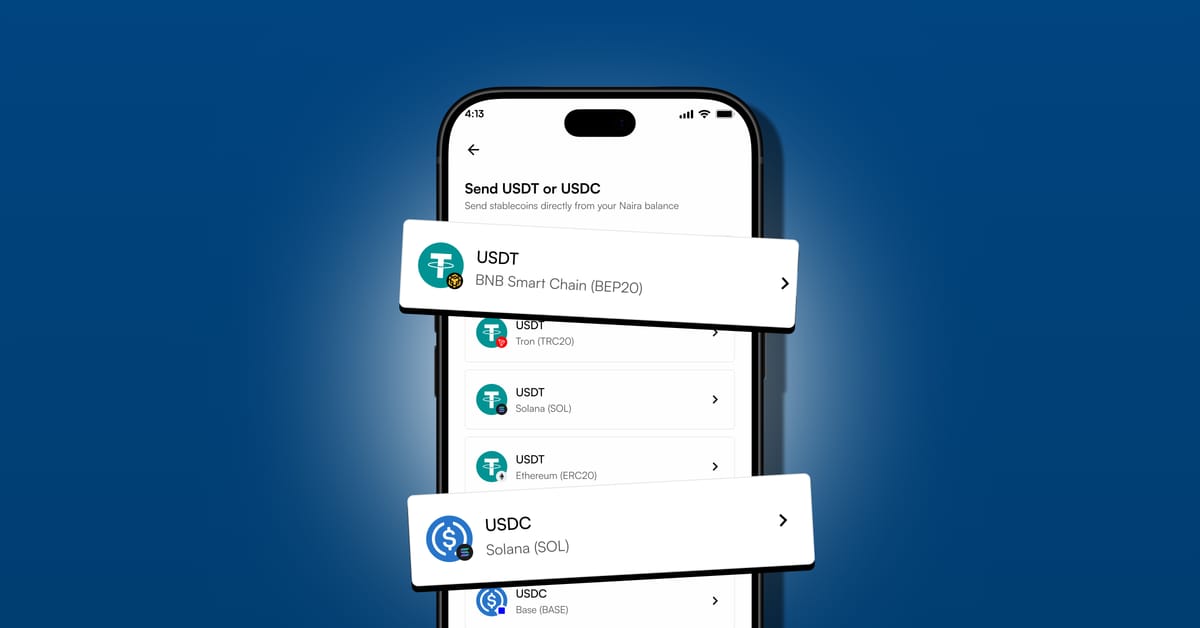
A simple guide to sending USDT and USDC directly from your Naira balance, no manual swaps, no unnecessary steps.
Whether you're paying someone, moving funds to another wallet, or sending stablecoins to an exchange, Spenda makes the process simpler. With Spenda 2.0, you can send stablecoins directly from your Naira balance in just a few simple steps.
What Are USDT and USDC?
USDT (Tether) and USDC (USD Coin) are stablecoins designed to maintain a value close to one US dollar. They're commonly used for digital payments, transferring funds, and accessing dollar-denominated value in the crypto ecosystem.
USDT and USDC operate across different blockchain networks, so choosing the correct network is essential when sending either asset.
Why Send Stablecoins With Spenda?
Spenda 2.0 makes stablecoin transfers more convenient by letting you send supported stablecoins directly from your Naira balance. Here's what makes it easier:
- Send directly from Naira: no need to manually swap Naira for USDT or USDC before sending.
- Instant transfers: transfers are designed to be instant, so you can move funds without unnecessary waiting.
- Multiple supported networks: choose from BEP-20, TRC-20, Solana (SOL), ERC-20, Base, and Arbitrum, where available for your selected stablecoin.
- Flexible transfer amounts: send the amount you need, subject to any applicable requirements displayed in the app.
- A simpler experience: manage your stablecoin transfers directly within Spenda.
How to Send USDT or USDC on Spenda
Sending stablecoins is straightforward. Follow these steps to get started.
Open the Spenda App
Make sure you have sufficient funds in your Naira balance.
Select Transfer
Navigate to Transfer, then select Stablecoins.
Choose USDT or USDC
Select the stablecoin you want to send, then choose the appropriate supported network for your transfer. Available options include BEP-20, TRC-20, SOL, ERC-20, Base, and Arbitrum, depending on the selected asset.
Enter the Amount
Enter how much USDT or USDC you want to send. Review the network, transfer amount, and applicable fee displayed, then continue.
Enter the Recipient's Wallet Address
Carefully enter the recipient's wallet address, and confirm that it supports the selected stablecoin on your chosen network.
Confirm and Send
Once you've verified all the details, confirm your transaction. Your stablecoins will be sent directly from your Naira balance, with no separate manual swap required.
Which Network Should You Choose?
Spenda supports multiple networks to give users flexibility when sending stablecoins. Here's a quick overview:
- TRC-20: the TRON network, commonly used for USDT transfers.
- BEP-20: the BNB Smart Chain network, which supports stablecoin transfers.
- SOL: the Solana network, known for fast blockchain transactions.
- ERC-20: the Ethereum network, widely used across the crypto ecosystem.
- Base: an Ethereum Layer 2 network.
- Arbitrum: another Ethereum Layer 2 network.
Network availability depends on the stablecoin selected. Always choose a network supported by both Spenda and the recipient's wallet or exchange. Never select a network based on the address format alone.
Important Things to Know Before Sending
Before confirming your transaction, keep these tips in mind:
- Double-check the wallet address. Even a small mistake can send funds to the wrong destination.
- Match the network. The network selected on Spenda must match the network supported by the recipient.
- Confirm the amount. Make sure you're sending the intended amount and have sufficient Naira to cover the transaction and applicable fees.
- Keep your transaction reference. Save the transaction details in case you need assistance.
Frequently Asked Questions
Can I send USDT and USDC directly from my Naira balance?
Yes. Spenda allows you to send supported USDT and USDC transfers directly from your Naira balance without manually swapping currencies first.
Are stablecoin transfers on Spenda instant?
Transfers are designed to be instant. Actual completion may depend on transaction processing and the selected blockchain network.
Which networks does Spenda support for stablecoin transfers?
Supported options include BEP-20, TRC-20, SOL, ERC-20, Base, and Arbitrum, subject to availability for the selected stablecoin. Check the options displayed in your app before sending.
Can I send any amount of USDT or USDC?
You can enter the amount you need to send, subject to any applicable transaction requirements shown in the app. Review the amount and fee before confirming.
Do I need to manually convert Naira to USDT or USDC first?
No. Spenda simplifies the process by allowing you to send supported stablecoins directly from your Naira balance.
Send Stablecoins the Simpler Way
Transfer supported stablecoins directly from your Naira balance, choose from multiple supported networks, and enjoy a simpler payment experience. Your Naira. Your stablecoins. One simpler experience with Spenda.
Download Spenda